
티스토리 뷰
반응형
| [1] | |
| [2] | Install MRTG, SNMP. |
| [root@dlp ~]#
yum -y install net-snmp net-snmp-utils mrtg |
| [3] | Configure SNMP (Simple Network Management Protocol). |
|
[root@dlp ~]#
vi /etc/snmp/snmpd.conf # line 41: comment out # com2sec notConfigUser default public # line 74,75: uncomment and change # change to your local network for "mynetwork" section # change comunity name except public or private com2sec local localhost
Serverworld com2sec mynetwork 10.0.0.0/24
Serverworld # line 78,79: uncomment and change group MyRWGroup v2c localgroup MyROGroup v2c mynetwork# line 85: uncomment view all included .1 80 # line 93,94: uncomment and change access MyROGroup "" v2c noauth
exact all none noneaccess MyRWGroup "" v2c noauth
exact all all all# show status (replace the "Serverworld" to your comunity name) [root@dlp ~]# snmpwalk -v2c -c Serverworld localhost system SNMPv2-MIB::sysDescr.0 = STRING: Linux dlp.srv.world 3.10.0-229.4.2.el7.x86_64 #1 SMP Wed May..... SNMPv2-MIB::sysObjectID.0 = OID: NET-SNMP-MIB::netSnmpAgentOIDs.10 DISMAN-EVENT-MIB::sysUpTimeInstance = Timeticks: (91954) 0:15:19.54 SNMPv2-MIB::sysContact.0 = STRING: Root <root@localhost> (configure /etc/snmp ..... ..... SNMPv2-MIB::sysORUpTime.9 = Timeticks: (4) 0:00:00.04 SNMPv2-MIB::sysORUpTime.10 = Timeticks: (4) 0:00:00.04 |
| [4] | Configure MRTG. |
| [root@dlp ~]#
cfgmaker --snmp-options=:::::2 --ifref=descr --ifdesc=descr Serverworld@10.0.0.30 > /etc/mrtg/mrtg.cfg [root@dlp ~]#
vi /etc/mrtg/mrtg.cfg # line 8: add WorkDir: /var/www/mrtg # line 16: uncomment Options[_]: growright, bits # near line 75: uncomment all from the line & change MaxBytes value Target[10.0.0.30_eth0]: \eth0:Serverworld@10.0.0.30:::::2 noHC[10.0.0.30_eth0]: yes SetEnv[10.0.0.30_eth0]: MRTG_INT_IP="10.0.0.30" MRTG_INT_DESCR="eth0" MaxBytes[10.0.0.30_eth0]: 125000000 Title[10.0.0.30_eth0]: eth0 -- dlp.srv.world PageTop[10.0.0.30_eth0]: <h1>eth0 -- dlp.srv.world</h1> ..... ..... # execute mrtg 3 times (display warnings until 3 times) [root@dlp ~]# for (( i=1 ; i <= 3 ; i++ )); do env LANG=C mrtg /etc/mrtg/mrtg.cfg; done 2015-06-16 19:54:12, Rateup WARNING: /usr/bin/rateup could not read the primary log file for 10.0.0.30_eth0 2015-06-16 19:54:12, Rateup WARNING: /usr/bin/rateup The backup log file for 10.0.0.30_eth0 was invalid as well 2015-06-16 19:54:12, Rateup WARNING: /usr/bin/rateup Can't rename 10.0.0.30_eth0.log to 10.0.0.30_eth0.old updating log file # generate index file [root@dlp ~]# indexmaker --columns=1 /etc/mrtg/mrtg.cfg > /var/www/mrtg/index.html # add in Cron [root@dlp ~]#
vi /etc/cron.d/mrtg */5 * * * * root LANG=C LC_ALL=C /usr/bin/mrtg /etc/mrtg/mrtg.cfg --lock-file /var/lock/mrtg/mrtg_l --confcache-file /var/lib/mrtg/mrtg.ok |
| [5] | Configure httpd to access MRTG site from other hosts. |
|
[root@dlp ~]#
vi /etc/httpd/conf.d/mrtg.conf # line 10: uncomment and add access permission, line 11: add DirectoryIndex Require ip 10.0.0.0/24 DirectoryIndex index.html systemctl start httpd |
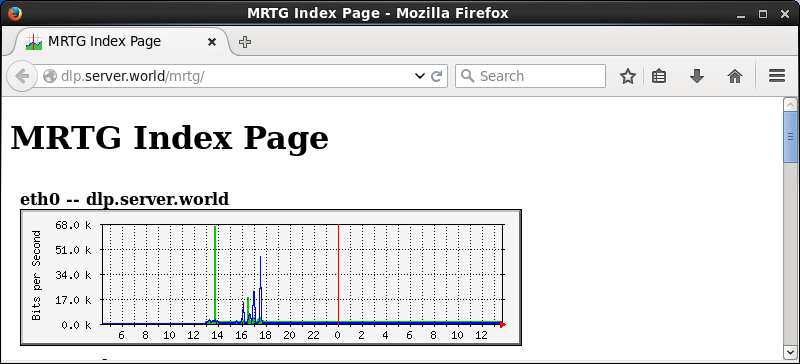
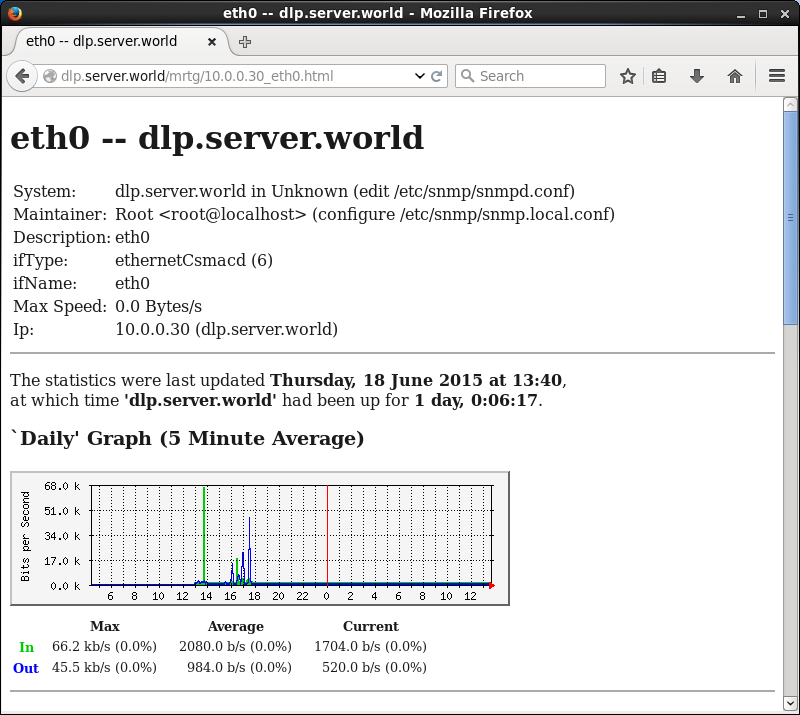
| [6] | Access to the "http://(MRTG hostname or IP address)/mrtg/" from a client with HTTP, then it's possible to see MRTG site. |
 |
 |
출처 : http://www.server-world.info/en/note?os=CentOS_7&p=mrtg
반응형
'서버 등 운영체제(OS) > Linux' 카테고리의 다른 글
| -bash: ./test.sh: /bin/bash^M: bad interpreter: 그런 파일이나 디렉토리가 없음 (0) | 2016.07.05 |
|---|---|
| CentOS 7 로케일 변경 (0) | 2016.06.28 |
| Short Tip: Get UUID of Hard Disks [Update] (0) | 2016.06.24 |
| yum update or yum install fails with package conflict between 64 bit and 32 bit package architectures ? (0) | 2016.06.17 |
| CentOS 저장장치(HDD) 추가 하기 (0) | 2016.06.17 |
반응형
공지사항
최근에 올라온 글
최근에 달린 댓글
- Total
- Today
- Yesterday
링크
TAG
- 2026
- 앱테크
- 혜택
- 우회
- 금융
- 아파트매매
- 신혼부부
- 해외주식
- 출산
- 내집마련
- 적금
- 지도
- 안과
- 투자
- ubuntu
- 재테크
- php
- 연말정산
- 세금
- 고금리
- 주담대
- etf
- 안드로이드
- 공제
- 카카오뱅크
- remove
- 정부
- 부동산
- 카뱅
- 대출
| 일 | 월 | 화 | 수 | 목 | 금 | 토 |
|---|---|---|---|---|---|---|
| 1 | 2 | 3 | ||||
| 4 | 5 | 6 | 7 | 8 | 9 | 10 |
| 11 | 12 | 13 | 14 | 15 | 16 | 17 |
| 18 | 19 | 20 | 21 | 22 | 23 | 24 |
| 25 | 26 | 27 | 28 | 29 | 30 | 31 |
글 보관함